Build Your First AI Agent
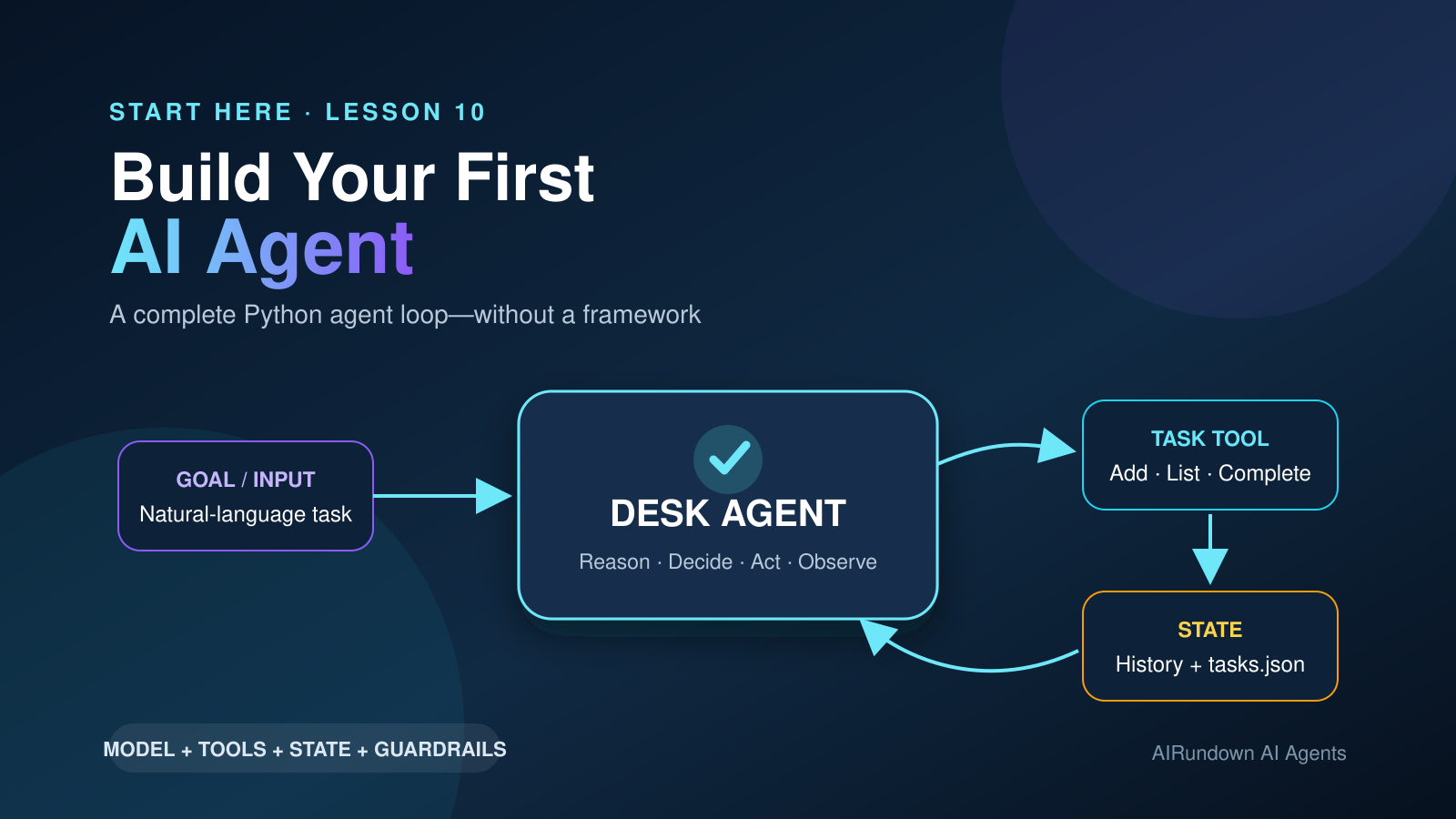
Build a small task agent in plain Python and watch every decision, tool call, observation, state change, and stopping condition.
You have already learned the pieces of an AI agent. This capstone turns them into a working system.
We will build Desk Agent, a command-line task assistant that can add, inspect, and complete tasks in a local JSON file. The example is deliberately small, but it is a genuine agent: the model decides which action is needed, selects a tool, supplies arguments, observes the result, and continues until it can answer or must stop.
No agent framework is required. Keeping the loop visible makes this a better first implementation—and gives you a foundation you can later move into a framework or production service.
What you will build
By the end, you will have a Python program that can handle requests such as:
Add “review launch copy” as a high-priority task, then show my open tasks.
The program will:
- accept the goal;
- send the goal, instructions, and tool definition to a model;
- receive a decision to call the task tool;
- validate and execute that tool locally;
- return the tool result as an observation;
- preserve the growing session state;
- let the model choose another action or provide a final answer; and
- stop safely after a final answer, an unrecoverable error, or a fixed step limit.
This is the practical version of the [agent execution loop](/how-ai-agents-work/) and the component architecture covered in [Anatomy of an AI Agent](/anatomy-of-an-ai-agent/).
TL;DR
- An agent needs more than a model call: it needs goals, instructions, tools, observations, state, and a controlled loop.
- The model requests a tool call; your application validates, authorizes, and executes it.
- Tool results must go back into the model's context so it can decide what to do next.
- Maximum steps, a tool allowlist, input validation, and constrained capabilities are basic guardrails—not optional extras.
- A small explicit loop is the fastest way to understand agents before adopting larger abstractions.
Before you start
You need:
- Python 3.10 or newer;
- an OpenAI API key;
- a terminal; and
- basic comfort copying commands and Python files.
The tutorial uses the OpenAI Python SDK and Responses API because their function-calling interface exposes the loop clearly. The agent design itself is provider-neutral: other APIs can implement the same control flow.
API usage has a cost. The program defaults to gpt-5.6-luna, a current cost-sensitive model that supports function tools. You can change the model through an environment variable without editing the code.
How the architecture maps to Lessons 01–09
| Implementation part | What it does | Earlier concept |
|---|---|---|
| User request | Defines the outcome the system should pursue | [What Is an AI Agent?](/what-is-an-ai-agent/) |
AGENT_INSTRUCTIONS | Sets role, boundaries, and stopping behavior | [Anatomy of an AI Agent](/anatomy-of-an-ai-agent/) |
| Model response | Interprets the goal and chooses the next action | [Reasoning in AI Agents](/reasoning-in-ai-agents/) |
TASK_TOOL | Describes an available capability and its arguments | [Tool Use in AI Agents](/tool-use-in-ai-agents/) |
AgentState.history | Holds working context for the current run | [Memory in AI Agents](/memory-in-ai-agents/) |
tasks.json | Persists task state across runs | [Memory in AI Agents](/memory-in-ai-agents/) |
| Repeated decisions | Select and sequence actions toward the goal | [Planning in AI Agents](/planning-in-ai-agents/) |
| Error observations | Let the model correct an invalid or failed action | [Reflection in AI Agents](/reflection-in-ai-agents/) |
| One model-driven worker | Solves the task without delegated agents | [Single-Agent vs Multi-Agent Systems](/single-agent-vs-multi-agent-systems/) |
Desk Agent does not implement every advanced form of these concepts. It uses their smallest useful versions.
The execution loop
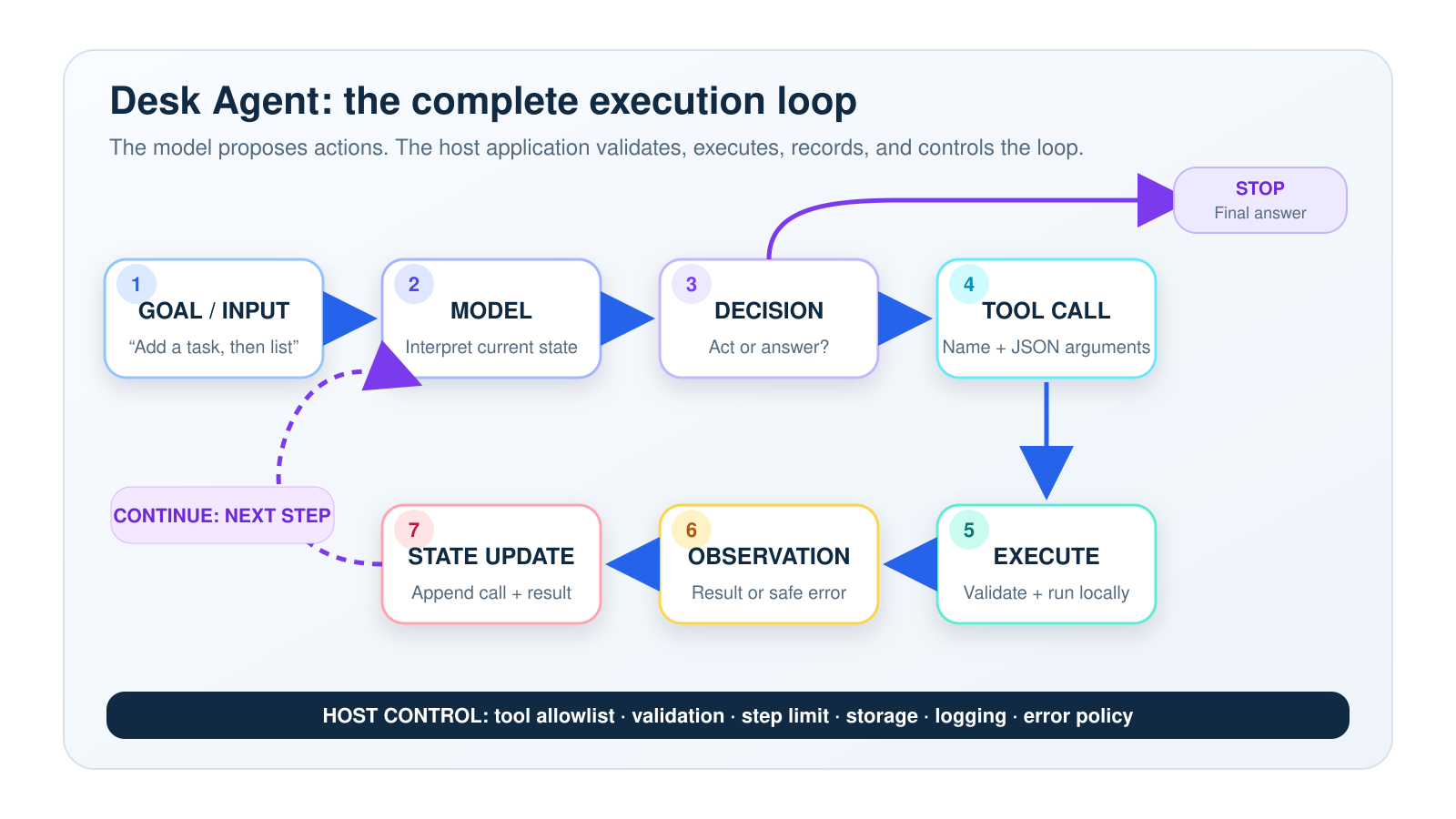
The application—not the model—owns tool execution, state, guardrails, and the stopping loop.
The important boundary is between deciding and doing:
- The model decides that
manage_tasksshould be called and proposes structured arguments. - Your Python program checks the request against an allowlist and validation rules.
- Your Python function performs the action.
- The function returns an observation.
- The model sees that observation and decides whether the goal is complete.
That boundary is what lets an agent act while keeping the host application in control.
Step 1: Create the project
Create a folder and virtual environment:
mkdir desk-agent
cd desk-agent
python -m venv .venv
Activate it on macOS or Linux:
source .venv/bin/activateOn Windows PowerShell:
.venvScriptsActivate.ps1Create requirements.txt:
openaiInstall the dependency:
python -m pip install -r requirements.txtSet your API key in the terminal. Do not paste it into the Python source.
On macOS or Linux:
export OPENAI_API_KEY="your_api_key_here"On Windows PowerShell:
$env:OPENAI_API_KEY="your_api_key_here"Optionally select another compatible model.
On macOS or Linux:
export OPENAI_MODEL="gpt-5.6-luna"On Windows PowerShell:
$env:OPENAI_MODEL="gpt-5.6-luna"Step 2: Add the complete agent
Create agent.py and copy the complete code below.
from __future__ import annotations

import json
import logging
import os
import sys
import time
import uuid
from dataclasses import dataclass, field
from pathlib import Path
from typing import Any

import openai
from openai import OpenAI


"""Configuration."""

MODEL = os.getenv("OPENAI_MODEL", "gpt-5.6-luna")
MAX_STEPS = 8
MAX_API_RETRIES = 2
TASKS_FILE = Path(__file__).with_name("tasks.json")

logging.basicConfig(
    level=logging.INFO,
    format="%(asctime)s | %(levelname)s | %(message)s",
)
logger = logging.getLogger("desk_agent")


"""Agent instructions."""

AGENT_INSTRUCTIONS = """
You are Desk Agent, a careful assistant that manages a local task list.

Your job:
- Understand the user's task-management goal.
- Use manage_tasks whenever you need to read or change the task list.
- Use tool observations to decide the next step.
- When the goal is complete, give a short, accurate summary.

Rules:
- Never claim a task was added, listed, or completed unless a tool observation
  confirms it.
- Do not invent task IDs.
- For "complete" requests without an ID, list open tasks first and use the
  returned data to identify the correct task.
- If multiple tasks could match, ask the user to clarify instead of guessing.
- A tool error is an observation. Correct the arguments and retry only when safe.
- Stop when the request is satisfied. Do not call tools unnecessarily.
""".strip()


"""
Strict schemas make tool arguments predictable. Every property is required;
optional values accept null.
"""
TASK_TOOL = {
    "type": "function",
    "name": "manage_tasks",
    "description": (
        "Read or change the local task list. Use add to create a task, list to "
        "inspect tasks, or complete to mark a task complete by exact task ID."
    ),
    "parameters": {
        "type": "object",
        "properties": {
            "action": {
                "type": "string",
                "enum": ["add", "list", "complete"],
                "description": "The task operation to perform.",
            },
            "title": {
                "type": ["string", "null"],
                "description": "Task title for add; otherwise null.",
            },
            "priority": {
                "type": ["string", "null"],
                "enum": ["low", "medium", "high", None],
                "description": "Priority for add; otherwise null.",
            },
            "task_id": {
                "type": ["string", "null"],
                "description": "Exact task ID for complete; otherwise null.",
            },
            "status": {
                "type": ["string", "null"],
                "enum": ["open", "completed", "all", None],
                "description": "Filter for list; otherwise null.",
            },
        },
        "required": ["action", "title", "priority", "task_id", "status"],
        "additionalProperties": False,
    },
    "strict": True,
}


"""Explicit agent state."""

@dataclass
class AgentState:
    goal: str
    history: list[Any] = field(default_factory=list)
    steps: int = 0
    api_calls: int = 0
    tool_calls: int = 0
    observations: list[dict[str, Any]] = field(default_factory=list)


"""Local task store."""

def load_tasks() -> list[dict[str, Any]]:
    """Load persistent task state. A missing file means an empty task list."""
    if not TASKS_FILE.exists():
        return []

    try:
        data = json.loads(TASKS_FILE.read_text(encoding="utf-8"))
    except (OSError, json.JSONDecodeError) as exc:
        raise RuntimeError(f"Could not read {TASKS_FILE.name}: {exc}") from exc

    if not isinstance(data, list):
        raise RuntimeError(f"{TASKS_FILE.name} must contain a JSON list.")
    return data


def save_tasks(tasks: list[dict[str, Any]]) -> None:
    """Write task state atomically so an interrupted write is less likely to corrupt it."""
    temporary_file = TASKS_FILE.with_suffix(".tmp")
    try:
        temporary_file.write_text(
            json.dumps(tasks, indent=2, ensure_ascii=False),
            encoding="utf-8",
        )
        temporary_file.replace(TASKS_FILE)
    except OSError as exc:
        raise RuntimeError(f"Could not write {TASKS_FILE.name}: {exc}") from exc


def manage_tasks(
    action: str,
    title: str | None,
    priority: str | None,
    task_id: str | None,
    status: str | None,
) -> dict[str, Any]:
    """Validated implementation of the only capability available to the model."""
    tasks = load_tasks()

    if action == "add":
        clean_title = (title or "").strip()
        if not clean_title:
            raise ValueError("title is required when action is 'add'.")
        if len(clean_title) > 120:
            raise ValueError("title must be 120 characters or fewer.")
        if priority not in {"low", "medium", "high"}:
            raise ValueError("priority must be low, medium, or high.")

        task = {
            "id": uuid.uuid4().hex[:8],
            "title": clean_title,
            "priority": priority,
            "status": "open",
        }
        tasks.append(task)
        save_tasks(tasks)
        return {"ok": True, "action": "add", "task": task}

    if action == "list":
        selected_status = status or "open"
        if selected_status not in {"open", "completed", "all"}:
            raise ValueError("status must be open, completed, or all.")
        selected = (
            tasks
            if selected_status == "all"
            else [task for task in tasks if task["status"] == selected_status]
        )
        return {
            "ok": True,
            "action": "list",
            "status": selected_status,
            "count": len(selected),
            "tasks": selected,
        }

    if action == "complete":
        clean_id = (task_id or "").strip()
        if not clean_id:
            raise ValueError("task_id is required when action is 'complete'.")

        for task in tasks:
            if task["id"] == clean_id:
                if task["status"] == "completed":
                    return {
                        "ok": True,
                        "action": "complete",
                        "already_completed": True,
                        "task": task,
                    }
                task["status"] = "completed"
                save_tasks(tasks)
                return {"ok": True, "action": "complete", "task": task}

        raise ValueError(f"No task exists with ID '{clean_id}'.")

    raise ValueError(f"Unsupported action '{action}'.")


"""Guarded tool execution."""

TOOL_HANDLERS = {
    "manage_tasks": manage_tasks,
}


def execute_tool(tool_name: str, arguments_json: str) -> dict[str, Any]:
    """
    Validate the requested tool, parse its arguments, and return a JSON-safe
    observation. Tool failures become observations instead of crashing the loop.
    """
    handler = TOOL_HANDLERS.get(tool_name)
    if handler is None:
        return {
            "ok": False,
            "error": "tool_not_allowed",
            "message": f"Tool '{tool_name}' is not permitted.",
        }

    try:
        arguments = json.loads(arguments_json)
        if not isinstance(arguments, dict):
            raise ValueError("Tool arguments must be a JSON object.")
        return handler(**arguments)
    except (json.JSONDecodeError, TypeError, ValueError, RuntimeError) as exc:
        return {
            "ok": False,
            "error": type(exc).__name__,
            "message": str(exc),
        }


"""Model call and agent loop."""

def request_model(client: OpenAI, state: AgentState):
    """Call the model with a small retry policy for transient API failures."""
    for attempt in range(MAX_API_RETRIES + 1):
        try:
            state.api_calls += 1
            return client.responses.create(
                model=MODEL,
                instructions=AGENT_INSTRUCTIONS,
                input=state.history,
                tools=[TASK_TOOL],
                parallel_tool_calls=False,
            )
        except (openai.APIConnectionError, openai.RateLimitError) as exc:
            if attempt == MAX_API_RETRIES:
                raise
            delay = 2**attempt
            logger.warning(
                "Transient API error (%s). Retrying in %s second(s).",
                type(exc).__name__,
                delay,
            )
            time.sleep(delay)


def run_agent(goal: str, client: OpenAI | None = None) -> str:
    """Run until the model answers, the step limit is reached, or an API call fails."""
    clean_goal = goal.strip()
    if not clean_goal:
        raise ValueError("Please provide a non-empty goal.")
    if len(clean_goal) > 2_000:
        raise ValueError("Goal must be 2,000 characters or fewer.")

    client = client or OpenAI()
    state = AgentState(
        goal=clean_goal,
        history=[{"role": "user", "content": clean_goal}],
    )

    while state.steps < MAX_STEPS:
        state.steps += 1
        logger.info("Step %s/%s: asking model for next action", state.steps, MAX_STEPS)

        response = request_model(client, state)

        """Preserve the model's messages and function calls as working context."""
        state.history.extend(response.output)

        tool_calls = [
            item for item in response.output if item.type == "function_call"
        ]

        """No tool request means the model has chosen to stop and answer."""
        if not tool_calls:
            final_answer = response.output_text.strip()
            if not final_answer:
                raise RuntimeError("Model stopped without a final answer.")
            logger.info(
                "Stopped: final answer | steps=%s api_calls=%s tool_calls=%s",
                state.steps,
                state.api_calls,
                state.tool_calls,
            )
            return final_answer

        for call in tool_calls:
            state.tool_calls += 1
            logger.info("Tool requested: %s | arguments=%s", call.name, call.arguments)

            observation = execute_tool(call.name, call.arguments)
            state.observations.append(observation)
            logger.info("Tool observation: %s", json.dumps(observation))

            """The call_id connects this observation to the model's request."""
            state.history.append(
                {
                    "type": "function_call_output",
                    "call_id": call.call_id,
                    "output": json.dumps(observation),
                }
            )

    raise RuntimeError(
        f"Agent stopped after reaching the {MAX_STEPS}-step safety limit."
    )


def main() -> int:
    goal = " ".join(sys.argv[1:]).strip()
    if not goal:
        goal = input("What should Desk Agent do? ").strip()

    try:
        print(run_agent(goal))
        return 0
    except (ValueError, RuntimeError, openai.APIError) as exc:
        logger.error("%s", exc)
        return 1


if __name__ == "__main__":
    raise SystemExit(main())
Step 3: Run the agent
Start with a goal that requires more than a final text response:
python agent.py "Add 'review launch copy' as a high-priority task, then show my open tasks."A typical log will resemble:
Step 1/8: asking model for next action
Tool requested: manage_tasks | arguments={"action":"add",...}
Tool observation: {"ok":true,"action":"add","task":{...}}
Step 2/8: asking model for next action
Tool requested: manage_tasks | arguments={"action":"list",...}
Tool observation: {"ok":true,"action":"list","count":1,...}
Step 3/8: asking model for next action
Stopped: final answer | steps=3 api_calls=3 tool_calls=2
The exact wording and number of model turns can vary. The invariant is the control flow: requested action, host execution, observation, updated context, next decision.
Try a few more goals:
python agent.py "Show my open tasks."
python agent.py "Complete the task called 'review launch copy'."
python agent.py "Add 'send release notes' with medium priority."
For the completion request, the model does not know the task ID initially. The instructions tell it to list tasks first, observe the real IDs, identify an unambiguous match, and only then request complete. That is a small example of state-aware planning.
What each important part does
The goal
The user provides an outcome, not a fixed sequence of functions:
Add “review launch copy” as high priority, then show my open tasks.The application does not hard-code add followed by list. The model decides those steps from the goal. That is the practical distinction introduced in [What Is an AI Agent?](/what-is-an-ai-agent/).
The instructions
AGENT_INSTRUCTIONS define the agent's job and behavior. They tell the model:
- when it must use the tool;
- what it may not claim without evidence;
- how to resolve missing IDs;
- when to ask for clarification; and
- when to stop.
Instructions shape decisions, but they are not a security boundary. Security comes from the capabilities the host actually exposes and the checks it enforces.
The model interaction
Each client.responses.create(...) call sends:
- the model name;
- the stable instructions;
- the current history; and
- the available tool schema.
The model can return text, a tool request, or other response items. The loop inspects the typed output rather than searching ordinary text for a command.
This is where [reasoning](/reasoning-in-ai-agents/) affects the system: the model interprets the current goal and observations, then selects a next action. The code does not receive or depend on hidden reasoning traces.
The tool definition
TASK_TOOL is a contract presented to the model. It contains:
- a stable name;
- a description of when to use it;
- allowed actions;
- argument types;
- enums for bounded values; and
- a strict JSON Schema.
The schema improves argument reliability. It does not replace runtime validation because a structurally valid request can still be unsafe or nonsensical.
The model does not directly execute manage_tasks. It emits a request containing the tool name, a unique call ID, and JSON arguments. The host application owns execution.
Tool execution and observations
execute_tool performs three control checks:
- the tool name must exist in
TOOL_HANDLERS; - the arguments must parse as a JSON object; and
- the local function must accept and validate the values.
The result becomes an observation:
{
  "ok": true,
  "action": "add",
  "task": {
    "id": "7fd12c0a",
    "title": "review launch copy",
    "priority": "high",
    "status": "open"
  }
}
The loop sends this result back as functioncalloutput using the original call_id. The model can now ground its next decision in what actually happened.
An error follows the same route:
{
  "ok": false,
  "error": "ValueError",
  "message": "No task exists with ID 'wrong-id'."
}
This matters. If an exception simply ends the process, the agent cannot recover. If an error is converted into an observation, the model can reconsider its last action, correct safe arguments, ask for clarification, or stop.
State and basic memory
Desk Agent has two kinds of state:
AgentState.historyis working context for one run. It contains the user goal, model outputs, tool calls, and tool observations.tasks.jsonis persistent task state. It survives after the process exits and is available in future runs through the tool.
This illustrates the difference between context, state, and durable memory discussed in [Memory in AI Agents](/memory-in-ai-agents/). A context window is not automatically a reliable database, and a database is not automatically useful context. The application deliberately retrieves task data through a tool when it is needed.
Continue or stop
The loop has three stopping paths:
- Successful stop: the model returns a final answer without requesting a tool.
- Safety stop:
MAX_STEPSprevents an unbounded loop. - Error stop: repeated API failure, invalid user input, corrupt storage, or an empty final response raises a controlled error.
Stopping conditions are part of agent design. “Keep going until it feels done” is not enough for a system that consumes money or can change external state.
Why this is an agent, not a normal LLM call
| System | Model decides next action? | Can act through tools? | Observes real results? | Maintains execution state? | Can loop? |
|---|---|---|---|---|---|
| One LLM call | Limited to producing the response | No | No | No | No |
| Typical chatbot | Produces conversational replies | Usually no | Usually no | Conversation only | Conversation turns |
| Desk Agent | Yes | Yes | Yes | Yes | Yes, within limits |
A normal LLM call could suggest JSON that looks like a task. It could not truthfully claim the task was saved unless the application executed a write and returned the result.
A chatbot might remember that you discussed a task inside its conversation. Desk Agent stores tasks in a system of record, reads them through a tool, and distinguishes a requested action from a confirmed action.
The model alone is not the agent. The agent is the whole system:
model + instructions + tools + execution loop + observations + state + guardrailsGuardrails included in this beginner agent
This implementation has small but real safety controls:
- Tool allowlist: only
manage_taskscan execute. - Narrow capability: the tool can add, list, or complete tasks; it cannot run shell commands, call arbitrary URLs, or delete files.
- Strict tool schema: tool arguments must match a constrained structure.
- Runtime validation: titles, priorities, statuses, IDs, and actions are checked again in Python.
- Bounded input: empty and excessively long goals are rejected.
- Maximum steps: the agent cannot loop forever.
- Sequential calls:
paralleltoolcalls=Falsekeeps the beginner flow deterministic and easier to inspect. - Evidence rule: instructions forbid claiming success without a confirming observation.
- Atomic storage write: task updates use a temporary file before replacement.
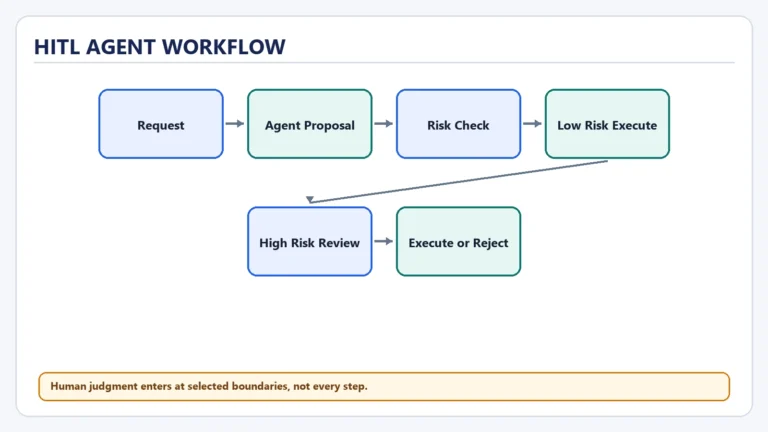
These controls are useful, but they do not make the system production-safe. For a consequential action—sending money, deleting data, publishing content, or contacting a customer—you would normally add authorization, human approval, idempotency, audit records, and policy checks.
Error handling: decide what can retry
The code separates two failure classes:
Transient model API failures
Connection and rate-limit errors receive a small exponential retry:
first retry: 1 second
second retry: 2 seconds
then stop
A production retry policy should add jitter, provider-recommended headers, observability, and a larger failure strategy. Blind retries can multiply cost or repeat side effects.
Tool and validation failures
Tool failures become observations. The model can fix a misspelled ID or ask the user to disambiguate. The host does not automatically repeat the write.
This distinction protects against a classic agent failure: retrying an action that may already have succeeded. Production tools should use idempotency keys or transaction records when duplicate execution would be harmful.
Logging and debugging the loop
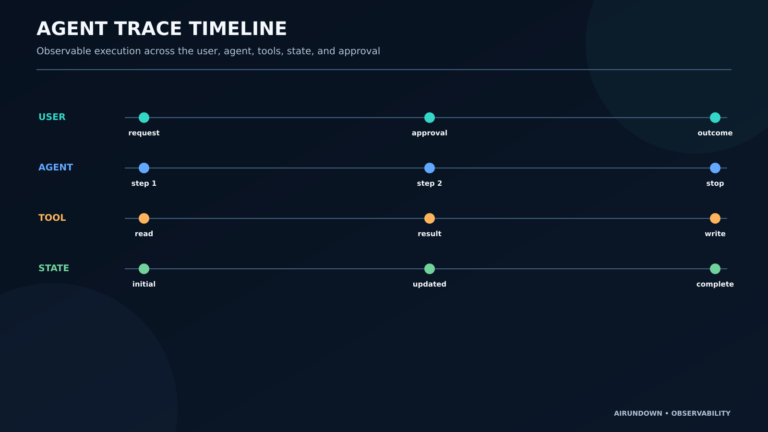
The logs answer four essential questions:
- Which step is running?
- Which tool did the model request?
- What arguments did it provide?
- What observation came back?
The final line records step, API-call, and tool-call counts. This is the beginning of agent observability.
Do not log secrets or sensitive tool outputs in a real deployment. Structured logs should use request IDs, sanitized arguments, latency, token usage, errors, and stop reasons. The SDK also exposes a request ID on API responses, which is valuable when diagnosing provider-side failures.
Test the finished agent
You should test the deterministic parts without spending API tokens, then run one real end-to-end check.
Create test_agent.py:
import json
import tempfile
import unittest
from pathlib import Path
from types import SimpleNamespace
from unittest.mock import patch

import agent


class TaskToolTests(unittest.TestCase):
    def setUp(self):
        self.temp_dir = tempfile.TemporaryDirectory()
        self.tasks_file = Path(self.temp_dir.name) / "tasks.json"
        self.path_patch = patch.object(agent, "TASKS_FILE", self.tasks_file)
        self.path_patch.start()

    def tearDown(self):
        self.path_patch.stop()
        self.temp_dir.cleanup()

    def test_add_list_and_complete(self):
        added = agent.manage_tasks(
            action="add",
            title="Review launch copy",
            priority="high",
            task_id=None,
            status=None,
        )
        task_id = added["task"]["id"]

        listed = agent.manage_tasks(
            action="list",
            title=None,
            priority=None,
            task_id=None,
            status="open",
        )
        self.assertEqual(listed["count"], 1)
        self.assertEqual(listed["tasks"][0]["title"], "Review launch copy")

        completed = agent.manage_tasks(
            action="complete",
            title=None,
            priority=None,
            task_id=task_id,
            status=None,
        )
        self.assertEqual(completed["task"]["status"], "completed")

    def test_invalid_priority_is_rejected(self):
        with self.assertRaises(ValueError):
            agent.manage_tasks(
                action="add",
                title="Unsafe input",
                priority="urgent",
                task_id=None,
                status=None,
            )

    def test_unknown_tool_returns_error_observation(self):
        result = agent.execute_tool("run_shell", json.dumps({}))
        self.assertFalse(result["ok"])
        self.assertEqual(result["error"], "tool_not_allowed")

    def test_agent_loop_executes_tool_then_stops(self):
        tool_call = SimpleNamespace(
            type="function_call",
            name="manage_tasks",
            arguments=json.dumps(
                {
                    "action": "add",
                    "title": "Test the full loop",
                    "priority": "medium",
                    "task_id": None,
                    "status": None,
                }
            ),
            call_id="call_test_1",
        )
        responses = [
            SimpleNamespace(output=[tool_call], output_text=""),
            SimpleNamespace(output=[], output_text="Task added."),
        ]

        class FakeResponses:
            def create(self, **_kwargs):
                return responses.pop(0)

        fake_client = SimpleNamespace(responses=FakeResponses())
        result = agent.run_agent("Add a test task.", client=fake_client)

        self.assertEqual(result, "Task added.")
        self.assertEqual(agent.load_tasks()[0]["title"], "Test the full loop")


if __name__ == "__main__":
    unittest.main()
Run the tests:
python -m unittest -vThen perform a real smoke test:
python agent.py "Add 'verify Desk Agent' as a medium-priority task, then list open tasks."Verify:
- the final answer matches the tool observations;
tasks.jsoncontains the added task;- logs show at least one tool request and observation;
- the agent stops before eight steps; and
- an unknown task completion produces a safe error or clarification, not a false success.
Tests for a production agent should also cover ambiguous requests, duplicate actions, timeouts, corrupt storage, prompt injection inside tool data, authorization, cost limits, and model behavior across a representative evaluation set.
Common problems
OPENAIAPIKEY is missing
The SDK will fail during client creation or the first request. Set the environment variable in the same terminal session running the program. Do not put the key in a committed file.
The model calls the tool with an unexpected value
Keep strict: True, additionalProperties: False, and all properties in the schema's required list. Values that are conceptually optional should allow null. Keep runtime checks because schema validity is not business validity.
The agent says it succeeded but the file did not change
Check that the instructions require tool evidence, inspect the tool observation, and confirm that save_tasks ran without error. Never treat the model's prose as proof of a side effect.
The agent reaches the step limit
Inspect the sequence of tool requests and observations. Common causes include vague instructions, a tool result that omits information needed for the next decision, an impossible goal, or an error the model keeps retrying. Improve the contract before merely raising MAX_STEPS.
tasks.json is corrupt
The program stops instead of overwriting unreadable data. Restore or repair the JSON list. In production, use a transactional database, backups, schema migrations, and concurrency controls.
Limitations of this beginner agent
Desk Agent is intentionally narrow:
- It is a single local process with one user and no authentication.
- A JSON file is not safe for concurrent writes or large-scale storage.
- Session history grows until the run ends; there is no context compaction.
- It has no semantic memory, retrieval system, or user profile.
- Its “planning” is implicit in repeated next-action decisions, not a separately stored plan.
- Reflection is limited to reacting to observations and errors.
- The retry strategy is minimal.
- It has no human approval checkpoint for writes.
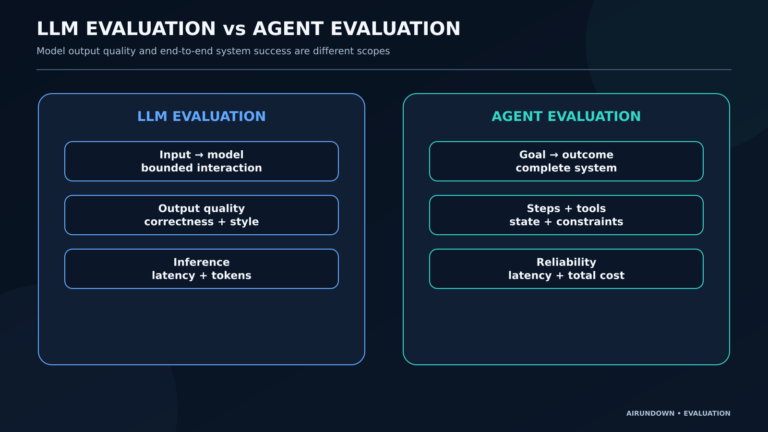
- It does not evaluate output quality beyond local tests.
- Tool descriptions and instructions can reduce mistakes but cannot guarantee correct model decisions.
These are not reasons to dismiss the implementation. They are the boundaries you should be able to name before extending it.
What you built
You built a single agent with:
- a user-defined goal;
- a reasoning-capable model;
- explicit instructions;
- a structured local tool;
- guarded tool execution;
- observations returned to the model;
- working and persistent state;
- a repeated decision loop;
- error handling and retries;
- logging;
- tests; and
- successful and safety stopping conditions.
That architecture is small enough to read in one sitting and real enough to act on persistent data.
How the complete loop works
Goal/Input
→ Model interprets the current state
→ Model decides whether an action is needed
→ Model selects manage_tasks and supplies arguments
→ Host validates and executes the tool
→ Tool returns an observation
→ Host appends the call and observation to state
→ Model continues with the updated context
→ Final answer or bounded stop
If you understand who owns each arrow, you understand the core of an AI agent.
My Take
The best first agent is not the most impressive demo. It is the smallest system where you can inspect every decision boundary.
Frameworks are valuable when you need durable workflows, persistence, approvals, tracing, or teams of specialized components. Starting with one framework-free loop first prevents those abstractions from becoming magic. You learn that most agent reliability work lives outside the model: capability design, state, validation, error semantics, stopping rules, and evaluation.
Logical next steps
Extend one dimension at a time:
- Add an update action with explicit validation and tests.
- Add a human confirmation step before completing or deleting anything.
- Replace the JSON file with a transactional database.
- Record structured traces, latency, tokens, cost, and stop reasons.
- Build an evaluation set of common, ambiguous, and adversarial requests.
- Add context compaction for longer runs.
- Separate high-risk tools from read-only tools with different permissions.
- Introduce a framework only when you need durable execution, checkpoints, or more complex orchestration.
Do not jump to a multi-agent system just because the project becomes larger. As [Lesson 09](/single-agent-vs-multi-agent-systems/) explains, one capable agent with several tools is often simpler, cheaper, and easier to evaluate. Add delegation only when specialized roles and coordination create more value than overhead.
You have now completed the [Start Here learning path](/start-here/): from the mental model of an agent to a working implementation.
Sources
- OpenAI function calling guide — function tool schemas, strict mode, call IDs, tool outputs, and the Responses API loop.
- OpenAI Python SDK — installation, Responses API usage, supported Python versions, errors, and request IDs.
- OpenAI model catalog — current model IDs and tool support.