Anatomy of an AI Agent: The 9 Core Components
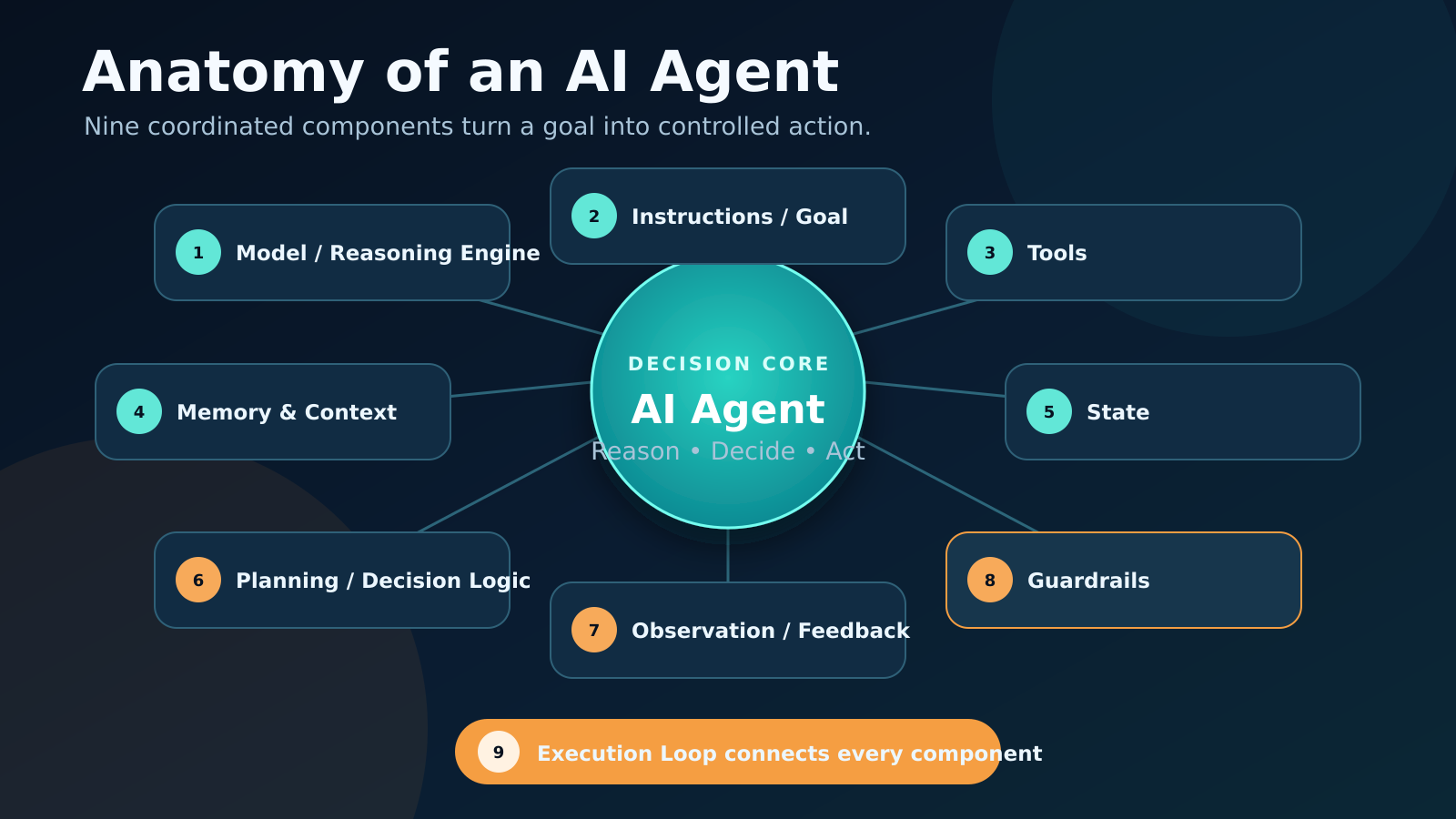
An AI agent is not just an LLM with a prompt. It is a coordinated system that turns a goal into controlled, observable action.
A language model can generate an answer. An agent must do more: understand a goal, choose a next step, use the right capability, inspect the result, remember what changed, and decide whether to continue.
That behavior does not come from the model alone. It comes from the architecture around the model.
This lesson opens that architecture and explains the nine parts that make an agent work. If you are new to the topic, first read [What Is an AI Agent? A Practical Mental Model](/what-is-an-ai-agent/). If you already understand the basic execution cycle, [How AI Agents Work](/how-ai-agents-work/) explains the loop in more detail.
TL;DR
- The model provides language understanding and reasoning, but the surrounding system controls what it can see and do.
- Instructions, context, memory, and state are different: they define the goal, supply current information, retain useful knowledge, and track run progress.
- Tools let the agent retrieve facts or change the outside world; observations return the consequences of those actions.
- Planning and decision logic choose the next step, while guardrails limit unsafe or invalid behavior.
- The execution loop connects every component and repeats until the task is complete, blocked, or stopped.
The Architecture in One View
The most useful mental model is to separate the agent into three layers:
- Decision layer: the model, instructions, planning, and decision logic determine what should happen next.
- Information layer: context, memory, and state provide the facts and progress needed for that decision.
- Action and control layer: tools, observations, guardrails, and the execution loop turn a decision into a controlled result.
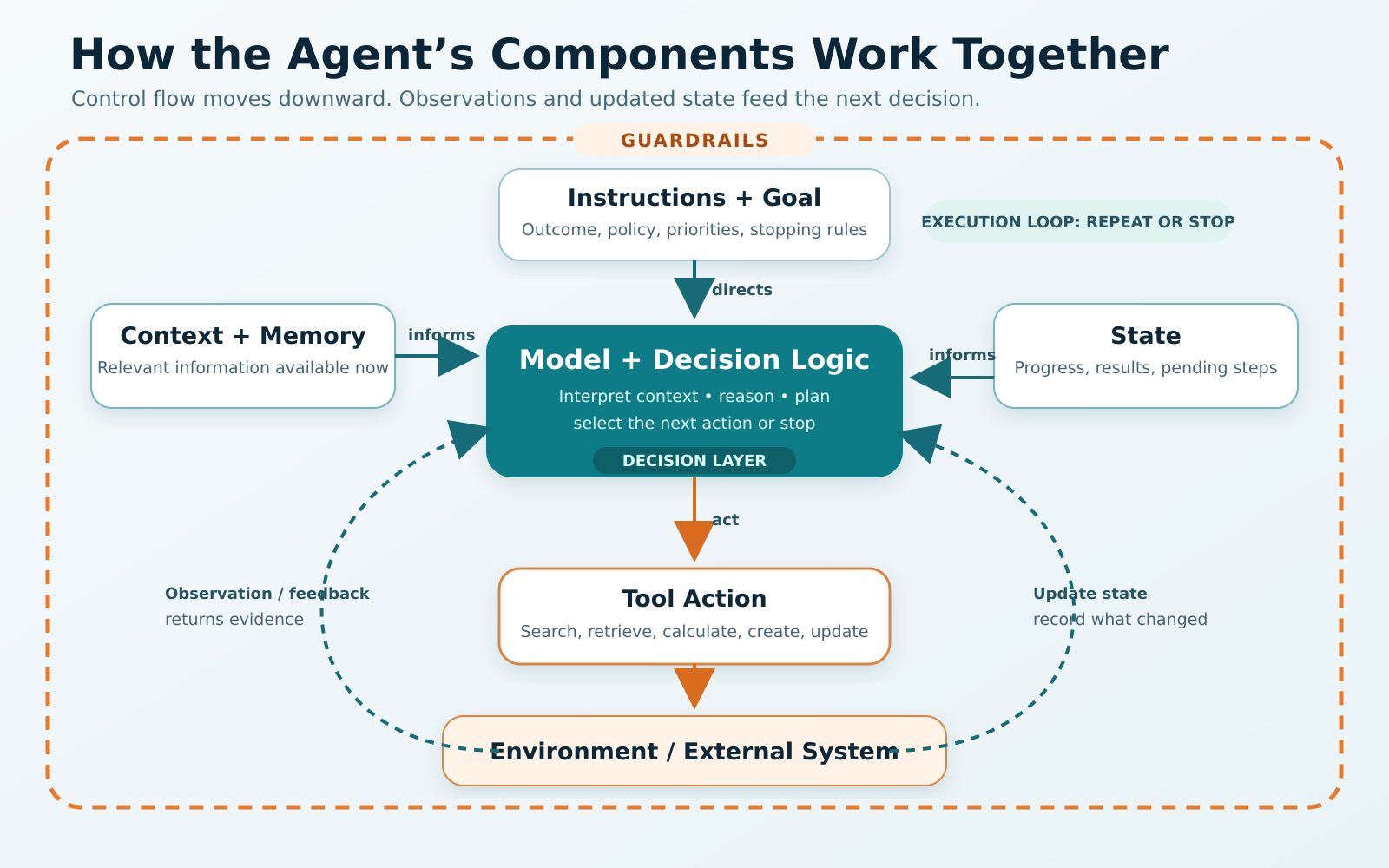
The model decides, the surrounding system supplies context and control, tools change the environment, and observations close the loop.
The OpenAI building-agents learning track describes models, tools, state or memory, and orchestration as composable primitives. That word—composable—matters. The components can be implemented in different ways, but each has a distinct job.
| Component | Core question | Simple example |
|---|---|---|
| Model / Reasoning Engine | What does this information mean? | Interprets a refund request |
| Instructions / Goal | What outcome and rules should guide the work? | “Resolve eligible refunds under $100” |
| Tools | What can the agent read or change? | Order lookup and refund API |
| Memory & Context | What information should be available now? | Customer message, policy, prior preferences |
| State | What has happened in this run? | Order found; eligibility not yet checked |
| Planning / Decision Logic | What should happen next? | Check delivery date before refunding |
| Observation / Feedback | What did the last action return? | “Order delivered 12 days ago” |
| Guardrails | What must be blocked, checked, or approved? | Manager approval above $100 |
| Execution Loop | Should the agent continue, stop, or ask for help? | Repeat until refund succeeds or escalates |
1. Model / Reasoning Engine
The model is the agent’s interpretation and decision engine. It reads the information placed in its context and produces a response, a structured decision, or a request to use a tool.
Depending on the system, one model may handle the whole task, or different models may handle classification, planning, tool selection, and final response generation.
The model commonly contributes:
- language understanding;
- reasoning over incomplete or messy inputs;
- selecting a next action;
- generating tool arguments;
- interpreting tool results;
- deciding when enough work has been done.
But the model is not the entire agent. It does not automatically know private company data, remember every previous interaction, or gain access to an API. Those abilities must be supplied by other components.
Design implication: choose a model for the hardest decision it must make, then test whether a smaller or faster model can meet the same quality target. Model capability, latency, and cost are architectural trade-offs—not a contest to use the largest model available.
2. Instructions / Goal
The goal tells the agent what success means. Instructions define how it should pursue that success.
Consider this weak instruction:
Help the customer with the order.
Now compare it with a usable version:
Resolve the customer’s order issue. Verify identity before revealing order details. Follow the refund policy. Never issue a refund above $100 without human approval. If required information is missing, ask one focused question.
The second version gives the agent:
- an outcome;
- a sequence of priorities;
- policy boundaries;
- an approval condition;
- behavior for missing information.
Instructions may come from several levels: system policy, product configuration, workflow-specific rules, and the user’s current request. When they conflict, the application needs a clear priority order.
Common failure: teams use a long prompt as a substitute for architecture. Instructions can guide a decision, but they should not be the only enforcement mechanism for permissions, financial limits, or security rules.
3. Tools
Tools turn an agent from a text generator into a system that can retrieve information or take action.
Typical tools include:
- search and retrieval;
- databases and knowledge bases;
- calculators and code execution;
- email, calendar, CRM, or ticketing APIs;
- file creation and editing;
- payment, refund, or account-management actions.
A tool needs more than a name. The model needs a clear description, understandable parameters, valid inputs, useful error messages, and an explicit explanation of when the tool should or should not be used.
The tool interface is part of the agent’s product design. If refundorder and cancelorder have vague descriptions or overlapping behavior, even a strong model may choose incorrectly.
Tools also have different risk levels. Reading a public knowledge base is not equivalent to transferring money or deleting a customer account. High-impact tools should use stricter permissions, validation, approval, and audit logging.
Boundary: access to a tool does not guarantee correct use. The model selects an action, but application code should still validate arguments and enforce authorization before execution.
4. Memory & Context
Context is the information available to the model during the current decision. Memory is a mechanism for retaining and retrieving information beyond one immediate model call.
They work together, but they are not the same.
Context may contain
- the current user request;
- instructions and policies;
- recent conversation turns;
- retrieved documents;
- tool definitions;
- current state;
- relevant memories.
Memory may retain
- user preferences;
- facts learned in earlier sessions;
- summaries of past work;
- reusable task knowledge;
- prior decisions and their outcomes.
Memory is useful only if the right information is retrieved at the right time. Saving everything creates noise, privacy risk, and stale assumptions. Good memory systems decide what to store, how long to keep it, when to retrieve it, and how to correct it.
| Concept | What it represents | Typical lifetime |
|---|---|---|
| Context | What the model can see for this decision | One model call or short interaction |
| Memory | Information retained for later retrieval | Across steps, runs, or sessions |
| State | The current task’s changing progress | Usually the duration of a run; sometimes resumable |
Common confusion: a long chat history is not automatically good memory. It is merely more context, and irrelevant context can make decisions worse.
5. State
State is the agent’s live record of what has happened and what remains unresolved.
For a refund agent, state might contain:
customer_verified: true
order_id: "A-1842"
order_found: true
refund_eligible: true
refund_amount: 64.00
refund_executed: false
next_required_step: "issue_refund"
This is different from natural-language memory. State should usually be structured, explicit, and easy for application code to inspect.
State allows an agent to:
- avoid repeating completed steps;
- resume after a pause or approval;
- track intermediate results;
- enforce step limits;
- show progress to the user;
- support tracing and debugging.
If state is missing or unreliable, the agent may call the same tool twice, forget an approval, or claim completion before the underlying action succeeds.
Design implication: the application—not the model alone—should own authoritative state for important operations.
6. Planning / Decision Logic
Planning determines how the goal becomes a sequence of actions. Decision logic selects the next step at each point.
An agent may use:
- implicit planning: decide only the next action;
- explicit planning: generate a visible multi-step plan before acting;
- deterministic routing: application code selects a fixed path;
- hybrid control: code enforces required stages while the model makes flexible decisions within them.
For a simple task, the plan might be:
- Identify the order.
- Verify the customer.
- Check refund eligibility.
- Issue the refund.
- Confirm the result.
The plan is not necessarily permanent. A tool result may reveal that the order belongs to another account, the policy may require an exception, or the refund service may be unavailable. The agent must update its next step using the new evidence.
The ReAct paper formalized a widely used pattern in which reasoning and actions are interleaved with observations. The important architectural lesson is not that every agent must expose private reasoning. It is that decisions should respond to real environmental feedback rather than follow an unchanging guess.
Trade-off: more planning can improve complex work, but it adds latency and may produce brittle plans when the environment changes. Plan only as far ahead as the task requires.
7. Observation / Feedback
An observation is information returned after an action.
Examples:
- a search tool returns three documents;
- an order API returns a delivery date;
- a code runner returns a failed test;
- a human rejects an approval request;
- a browser reports that a button is disabled.
The agent uses the observation to update state and choose the next action. This is what grounds the run in the environment.
Observations need careful design. A raw 20,000-line log may be technically complete but practically useless. A better tool can return a structured error code, a concise message, and the small amount of diagnostic context needed for recovery.
Feedback can also come from evaluators, rule-based checks, or humans. A writing agent might draft text, run a factuality check, revise the unsupported section, and then request editorial approval.
Common failure: the action succeeds, but the result is never verified. A tool call being accepted is not the same as the intended outcome being achieved.
8. Guardrails
Guardrails are controls that reduce unsafe, unauthorized, invalid, or unwanted behavior.
They can operate at several points:
- input controls: detect prompt injection, restricted requests, or sensitive data;
- decision controls: limit available tools or require specific checks;
- tool controls: validate arguments, permissions, and spending limits;
- output controls: scan for policy violations, secrets, or unsupported claims;
- runtime controls: cap iterations, time, cost, or repeated failures;
- human checkpoints: pause consequential actions for approval.
Guardrails should be layered. A prompt that says “never refund more than $100” is helpful, but the refund service should also reject unauthorized amounts in code.
The OpenAI practical guide to building agents treats guardrails as a critical layer and recommends combining multiple controls rather than relying on one check.
Trade-off: excessive controls can make an agent slow or unable to help. The goal is not to eliminate all autonomy. It is to match autonomy to the consequence of the action.
9. Execution Loop
The execution loop is the runtime mechanism that connects all the other parts.
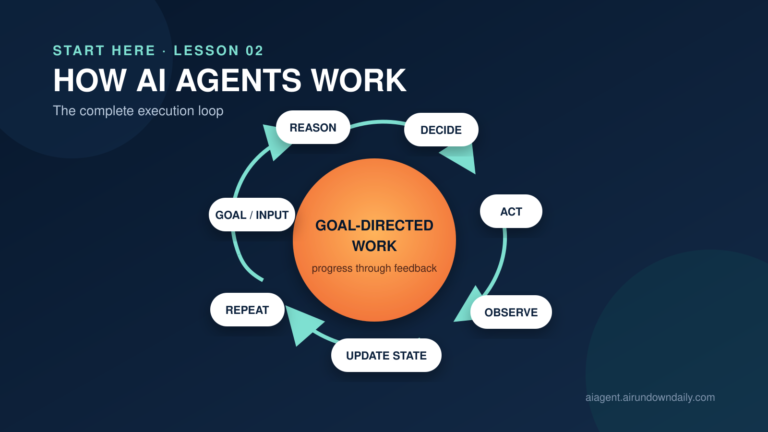
At a high level, it does this:
Receive goal and current context
→ Ask the model for the next decision
→ Validate the decision
→ Execute an approved tool or produce an answer
→ Capture the observation
→ Update state and context
→ Repeat or stop
The loop should stop when:
- the goal is complete;
- the agent needs information from the user;
- human approval is required;
- a policy blocks further action;
- a tool or dependency cannot recover;
- a time, cost, or iteration limit is reached.
Without clear exit conditions, an agent may loop indefinitely, repeat actions, or continue spending resources after the useful work is finished. The full mechanics are covered in [How AI Agents Work](/how-ai-agents-work/).
A Practical Walkthrough: The Refund Agent
Suppose a customer says:
My headphones arrived damaged. Please refund order A-1842.
Here is how the anatomy works as one system:
- Goal and instructions: resolve the issue while following identity and refund policies.
- Context: the agent receives the customer message, relevant policy, tool definitions, and current account session.
- Model and decision logic: it notices that identity must be verified before order details can be exposed.
- Tool action: it calls the identity-verification tool.
- Observation: verification succeeds.
- State update:
customer_verifiedbecomestrue. - Next decision: the agent looks up order A-1842.
- Observation: the order exists, was delivered two days ago, and costs $64.
- Planning: the agent checks the damage-return policy and determines the order is eligible.
- Guardrails: the amount is below the approval threshold, and the refund arguments pass validation.
- Tool action: the refund API executes the refund.
- Final observation: the API returns a refund ID and estimated settlement time.
- Exit: state records successful completion, and the agent gives the customer a grounded confirmation.
No single component completed the task. The result came from coordination across all nine.
How the Components Fail
| Weak component | Likely behavior |
|---|---|
| Model | Misunderstands the request or chooses a poor action |
| Instructions | Optimizes for the wrong outcome or ignores business policy |
| Tools | Cannot access needed facts or performs the wrong operation |
| Context | Makes a decision without relevant information |
| Memory | Retrieves stale, irrelevant, or private information |
| State | Repeats work, loses progress, or misreports completion |
| Planning | Takes unnecessary steps or fails to adapt |
| Observation | Misses errors or cannot verify the result |
| Guardrails | Allows harmful action—or blocks legitimate work |
| Execution loop | Runs too long, stops too early, or cannot recover |
This is why “the model gave a bad answer” is often an incomplete diagnosis. The root cause may be a missing policy, an ambiguous tool, stale memory, malformed feedback, or incorrect state.
Agent vs Workflow: Where Is the Decision Made?
A fixed workflow follows paths chosen in advance by developers. An agent allows the model to choose at least some of its next actions based on the current situation.
Anthropic’s guide to building effective agents makes this distinction explicit: workflows use predefined code paths, while agents dynamically direct their process and tool usage.
Most production systems are hybrids:
- code controls identity, permissions, transaction rules, and mandatory steps;
- the model handles interpretation, flexible planning, and exception-aware decisions;
- humans approve actions with high cost or consequence.
That is usually a strength, not a compromise. Deterministic code and model-driven judgment solve different parts of the problem.
What Builders Should Decide
Before selecting a framework, answer these questions:
- What exact outcome defines success?
- Which decisions genuinely require model judgment?
- What information belongs in immediate context?
- What, if anything, should persist as memory?
- What state must remain authoritative outside the model?
- Which tools are read-only, reversible, or high-impact?
- What evidence confirms that each action succeeded?
- Where should rules, approvals, and limits be enforced?
- What stops the loop?
These decisions define the agent more than the framework logo in the architecture diagram.
My Take
The best way to understand an AI agent is as a controlled decision system—not as an unusually smart chatbot.
The model supplies flexible judgment. The rest of the architecture supplies information, capability, continuity, feedback, and control. If one of those surrounding parts is weak, a more powerful model may only produce failures more confidently or at greater scale.
Start with the smallest loop that can solve the task. Keep state explicit. Make tool contracts obvious. Verify actions using real observations. Add memory only when the task benefits from persistence. Put hard rules in code, and reserve human approval for consequences that deserve it.
The Next Step
You now have a component map for an AI agent. The next lesson, Reasoning in AI Agents, zooms into the decision engine: how an agent interprets a situation, evaluates options, and chooses what to do next.
Before moving on, take any agent product you use and identify its model, instructions, tools, context, memory, state, decision logic, observations, guardrails, and stopping conditions. If one component is invisible, ask whether it is missing—or simply hidden behind the interface.