Tool Use in AI Agents: How Agents Act Beyond the Model
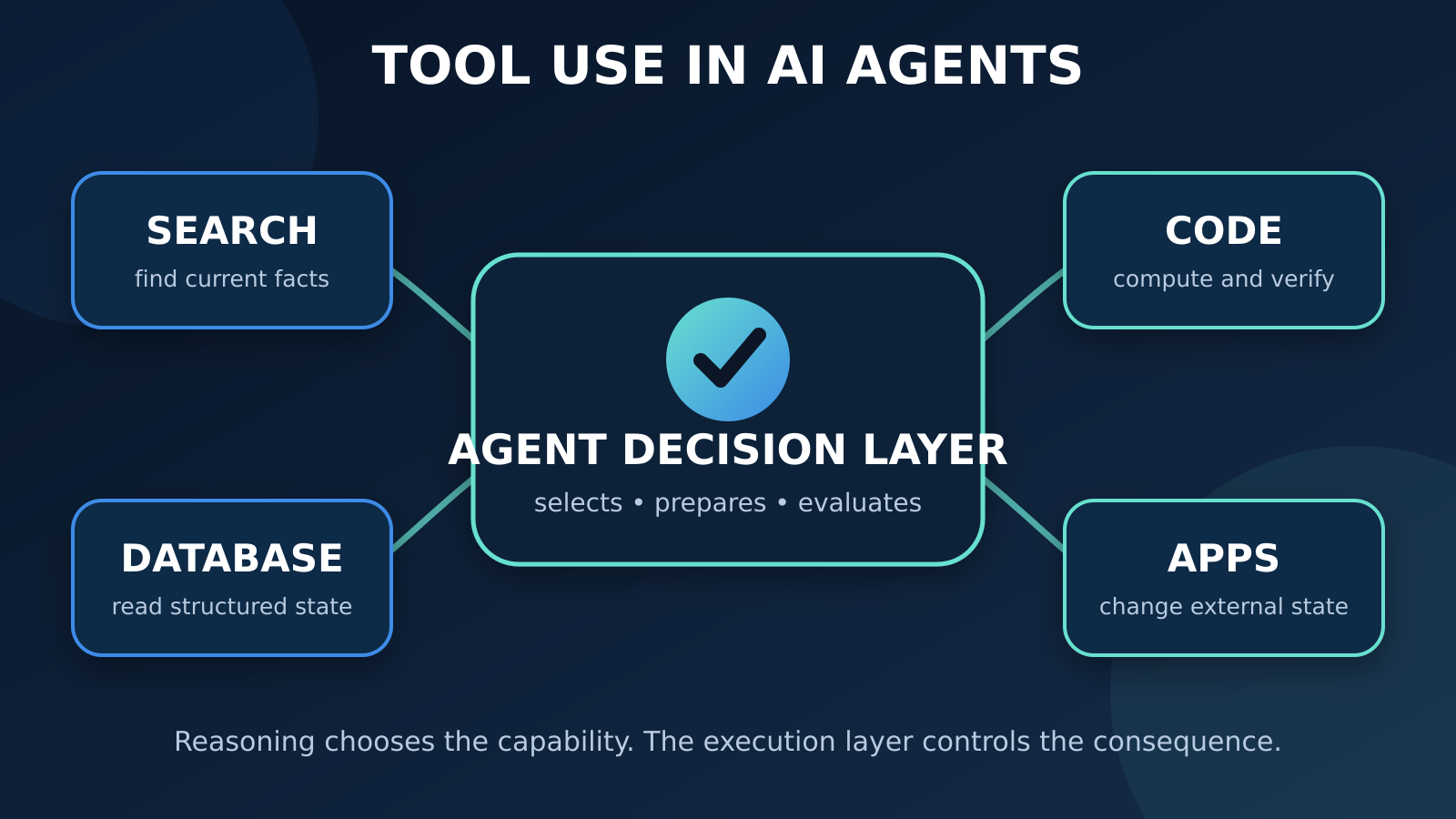
Tools turn a language model from a system that can describe work into an agent that can retrieve data, perform computation, and change the outside world.
A language model can explain how to check an order, calculate a refund, or schedule a delivery. But explanation is not execution. To actually look up the order, calculate against current policy, or update the delivery system, an AI agent needs tools.
This is the practical dividing line between “the model knows what to say” and “the system can do something.” It builds on the basic definition of an [AI agent](/what-is-an-ai-agent/), the repeating [agent execution loop](/how-ai-agents-work/), and the component view in the [anatomy of an AI agent](/anatomy-of-an-ai-agent/).
TL;DR
- A tool is a capability exposed to an agent, such as search, a database query, code execution, or an action in another application.
- The model usually proposes a tool and its arguments; software outside the model validates and executes the request.
- Tool use follows a loop: Need → Select Tool → Prepare Input → Execute → Observe Result → Decide Next Step.
- A tool call is not the same as an API integration. The integration is the surrounding code, authentication, validation, execution, and error handling.
- Safe agents receive the minimum capabilities and permissions needed, with approval gates for high-impact actions.
What “tool use” actually means
A tool is an operation the agent is allowed to request.
It may return information:
- search the web
- look up a customer record
- query a product database
- retrieve a document
- check the current weather
It may perform computation:
- calculate a price
- run Python
- transform a file
- validate data
- execute a test suite
Or it may change an external system:
- create a support ticket
- update a CRM record
- schedule a meeting
- send a message
- submit an order
The language model does not magically gain direct access to these systems. The agent application exposes specific capabilities and decides how calls are executed. In common function-calling designs, the model returns a structured request containing a tool name and arguments. The surrounding application validates it, runs the corresponding code or service, and returns the result to the model. Official documentation from OpenAI, Anthropic, and Google all describe variations of this same core round trip.
That separation matters:
The model proposes. The execution layer disposes.
The model can choose an action, but the system still controls whether that action is valid, authorized, and safe to run.
The anatomy of a tool definition
An agent cannot use a capability reliably if it does not know what the capability is or what input it expects. A function-style tool definition commonly includes:
| Part | Purpose | Example |
|---|---|---|
| Name | Gives the model a stable operation to select | getorderstatus |
| Description | Explains what the tool does and when to use it | “Return the latest delivery status for one order” |
| Parameters | Defines accepted inputs and their types | order_id: string |
| Required fields | Prevents incomplete requests | order_id is required |
| Constraints | Limits values or formats | ISO date, known status enum |
| Result contract | Defines what execution returns | status, promised date, last scan |
A narrow, precise tool is easier to select and safer to run than a vague one.
Compare these two options:
manage_order(instructions: string)getorderstatus(order_id: string)
The first gives the model a broad surface with unclear behavior. The second has a single purpose and a predictable input. If the agent also needs to cancel or reschedule an order, those should usually be separate tools with separate permissions and approval rules.
Tool descriptions are part of the agent’s working context. If two tools have overlapping descriptions, the agent may select the wrong one. If a required parameter is poorly explained, the model may supply an invalid value. Good tool design is therefore not only an integration task; it is also part of context engineering.
The tool-use loop
Tool use is not a one-off command. It sits inside the agent’s broader observe-and-decide cycle:
Need → Select Tool → Prepare Input → Execute → Observe Result → Decide Next Step
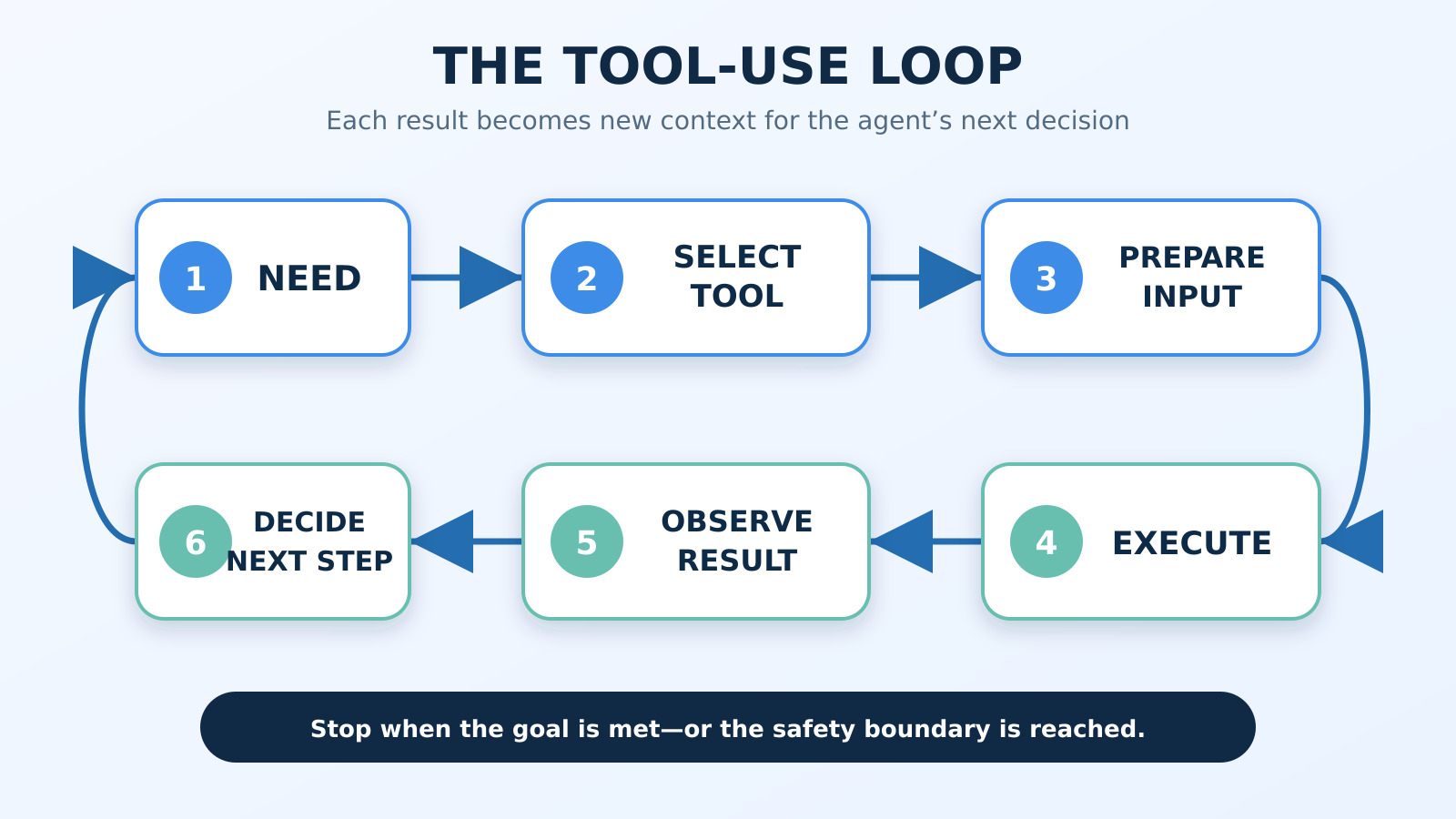
1. Need
The agent first recognizes a gap between the current state and the goal.
If a user asks, “Is my package arriving today?”, the model should not rely on general knowledge. The answer depends on current private data. The agent needs an order lookup.
Not every request needs a tool. Writing a friendly greeting or explaining a stable concept may be handled directly. Tool use adds latency, cost, failure points, and sometimes risk, so the agent should call a tool because the task requires it—not because a tool happens to be available.
2. Select Tool
The agent compares the need with the tools it is allowed to use.
For current delivery status, getorderstatus is a better match than searchhelpcenter or reschedule_delivery. This selection is a [reasoning decision](/reasoning-in-ai-agents/): the agent interprets the goal, examines available capabilities, and chooses the most appropriate next operation.
Selection quality depends on:
- clear tool names and descriptions
- limited overlap between tools
- the right tools being available for the current user and task
- examples and constraints in the tool definition
- policies that require, allow, or prohibit particular tools
3. Prepare Input
The agent converts the user’s request and current context into structured arguments.
For example:
{
  "order_id": "4817"
}
The execution layer should validate this input before doing anything. Validation may check the schema, data type, format, allowed values, ownership of the order, and whether required user confirmation exists.
If necessary information is missing, the correct next step is often to ask the user—not to guess.
4. Execute
The tool handler performs the operation. Depending on the tool, execution might happen:
- inside the agent application
- in a hosted tool environment
- through an external API
- against a database
- inside a restricted code sandbox
- through an automation layer connected to another application
Execution should enforce authentication and authorization independently of the model. A prompt that says “I am an administrator” is not proof of administrator access.
5. Observe Result
The tool returns an observation, sometimes called a tool result or function output.
{
  "status": "delayed",
  "promised_date": "2026-07-30",
  "next_available_date": "2026-07-31"
}
The result becomes new context for the agent. It may answer the question, reveal that another tool is needed, or show that execution failed.
Tool output is data, not automatically truth. Results can be stale, incomplete, malformed, malicious, or inconsistent with another source. An agent should interpret the result, not blindly repeat or obey it.
6. Decide Next Step
The agent evaluates the observation against the original goal.
It may:
- answer the user
- call another tool
- retry with corrected input
- ask for missing information
- request approval for an action
- stop because the task cannot be completed safely
This is why a tool call is not the finish line. It is one action within a continuing decision loop.
A practical example: rescheduling a delayed delivery
Suppose the user says:
“Check order 4817. If it is delayed, move delivery to Friday.”
A well-designed agent could proceed like this:
- Need current state: The model cannot know the live order status.
- Select a read tool: Call
getorderstatus(order_id="4817"). - Observe: The order is delayed.
- Need a valid option: Call
getdeliveryslots(orderid="4817", preferredday="Friday"). - Observe: Two Friday slots are available.
- Need user choice and approval: Ask the user to select a slot and confirm the change.
- Select a write tool: After confirmation, call
rescheduledelivery(orderid="4817", slotid="F2", confirmationtoken="..."). - Observe: The delivery system returns a new confirmed date and change ID.
- Finish: Tell the user exactly what changed.
The agent reasons between calls, while the tools retrieve or change external state. Notice the permission boundary: status lookup is read-only, but rescheduling changes the real world and requires confirmation.
Common kinds of agent tools
Search
Search tools retrieve information that is current or outside the model’s supplied context. They may search the public web, an internal knowledge base, or a product catalog.
The main challenge is not merely finding results. The agent must judge relevance, freshness, authority, and conflicts between sources.
Databases
Database tools let agents read or write structured business data. A production agent should rarely receive an unrestricted SQL connection. Safer designs expose narrow queries or controlled operations, enforce row-level access, parameterize inputs, and separate read permissions from write permissions.
APIs
APIs connect the agent to services such as payments, logistics, calendars, CRMs, analytics systems, or internal platforms. The API remains the external system’s interface; the agent tool is the agent-facing wrapper that defines what the model may request.
Code execution
Code execution helps with calculations, data transformation, file processing, testing, and iterative problem-solving. It is powerful because code can combine many operations. That also makes it high-risk.
Use an isolated environment with resource limits, restricted network and filesystem access, timeouts, and explicit controls over which outputs may leave the sandbox.
External applications
An agent may interact with email, documents, browsers, ticketing systems, design tools, or desktop software. Some integrations expose structured actions. Others use a user interface through screenshots, clicks, and typing.
Structured actions are generally easier to validate and observe. UI automation is useful when no suitable API exists, but it is more sensitive to layout changes, ambiguous screens, and unintended clicks.
Function calling is not the same as API integration
The terms are related, but they describe different layers.
| Concept | What it is | What it does not guarantee |
|---|---|---|
| Function or tool calling | A model returns a structured request for a named capability | That the action has executed |
| Tool handler | Application code validates and routes the request | That the downstream service will succeed |
| API integration | Authentication, network calls, data mapping, retries, and service-specific logic | That the model will select it correctly |
| Tool result | The observation returned after execution | That the result is complete, safe, or sufficient |
Function calling is the model-to-application contract. API integration is the application-to-service implementation.
An agent might call create_ticket with valid arguments while the support API is unavailable. The tool call succeeded as a structured model output; the external action did not. Reliable systems track these states separately.
Four boundaries that are easy to confuse
Reasoning vs tool use
Reasoning decides what information or action is needed and what to do with the result. Tool use performs the lookup, computation, or external operation.
The agent may reason that it needs today’s exchange rate. The currency tool retrieves it.
Tool calling vs API integration
Tool calling expresses intent in a structured form. API integration authenticates, sends the real request, handles the service response, and reports success or failure.
The model does not replace integration engineering.
Tools vs memory
Memory preserves or retrieves information across the agent’s work, such as a user preference, prior decision, or task history. A tool provides a capability.
The two can overlap in implementation—a memory store may be accessed through a retrieval tool—but their roles differ. Memory answers “what should this agent retain or recall?” Tooling answers “what operation can this agent request?”
Tools vs agent actions
An action is any step the agent takes toward the goal. Some actions use tools; others do not.
Examples:
- choosing to ask a clarifying question is an agent action without an external tool
- calling a database is both an agent action and a tool use
- deciding not to send an email because approval is missing is also an agent action
The tool is the capability. The action is the agent’s chosen step.
Errors, retries, and recovery
Tool use introduces failure modes that pure text generation does not have.
| Failure | Example | Appropriate response |
|---|---|---|
| Invalid arguments | Date has the wrong format | Correct once or ask for missing input |
| Authentication failure | Token expired | Refresh through approved flow or stop |
| Permission denied | User cannot access the record | Stop and explain the boundary |
| Timeout or rate limit | Service is temporarily busy | Retry with bounded backoff |
| No result | Order ID does not exist | Verify the identifier with the user |
| Partial success | Ticket created, attachment failed | Report both states; do not repeat the whole action blindly |
| Conflicting data | Two systems show different status | Surface uncertainty or use an authoritative source |
| Unsafe request | Tool input would violate policy | Refuse or route for review |
A retry is useful only when the failure is plausibly temporary or correctable.
Blind retries can duplicate charges, messages, bookings, or records. Write operations should use idempotency controls where possible, so repeating the same request does not repeat the real-world effect. Every agent also needs stopping conditions: maximum attempts, time budget, cost budget, and a rule for when to ask a person for help.
Permissions and safety boundaries
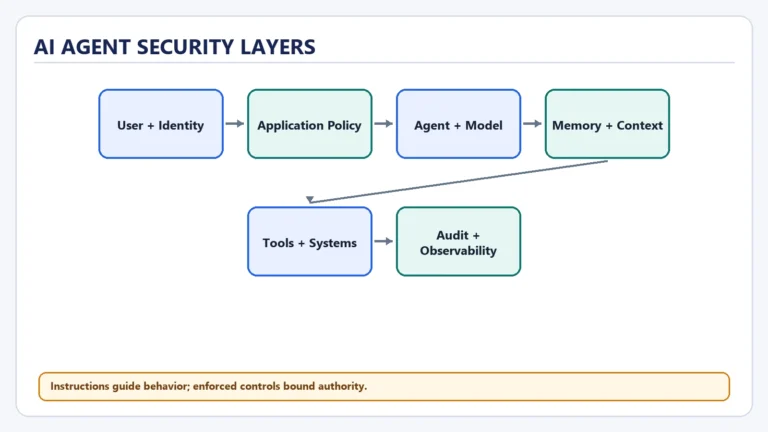
Tools are where model output gains consequences. Safety therefore belongs in the execution architecture, not only in the prompt.
Use these controls:
- Least privilege: Give each tool only the data and operations required for its job.
- Separate read from write: Do not bundle “view,” “update,” and “delete” into one broad capability.
- Validate every call: Enforce schemas, business rules, ownership, and authorization outside the model.
- Require approval for high-impact actions: Payments, deletion, publishing, account changes, and external communication should pause at a clear confirmation point.
- Isolate powerful tools: Run code, browser control, and file operations in restricted environments.
- Treat results as untrusted input: Search pages, emails, documents, and tool responses may contain malicious instructions or corrupted data.
- Protect secrets: Credentials belong in the execution layer and should not be exposed to the model unless strictly required.
- Set limits: Cap calls, cost, runtime, output size, and retry count.
- Log decisions and effects: Record the selected tool, validated arguments, approval, result, and external change ID.
OWASP describes “excessive agency” as risk created by too much functionality, permission, or autonomy. Its recommended mitigations include minimizing available tools and permissions, avoiding unnecessarily open-ended operations, enforcing authorization in downstream systems, and requiring human approval for high-impact actions (OWASP LLM06:2025).
The core principle is simple:
Do not ask the model to enforce a boundary that the system can enforce deterministically.
What builders and product teams should measure
Tool reliability is more than “did the final answer look good?” Evaluate each layer:
- Need recognition: Did the agent know when external data or action was required?
- Selection accuracy: Did it choose the right tool?
- Argument accuracy: Were inputs complete, valid, and grounded in the user’s request?
- Execution success: Did the handler and downstream system complete the operation?
- Observation use: Did the agent interpret the result correctly?
- Recovery quality: Did it retry only when appropriate?
- Policy compliance: Did it respect permissions and approval gates?
- User clarity: Did it clearly report what was done, what failed, and what still needs confirmation?
These stages should appear separately in traces and evaluation datasets. A correct final sentence can hide a failed action. A failed API call can hide an excellent selection decision. Without stage-level visibility, teams fix the wrong problem.
My Take
The best agent toolset is not the largest one. It is the smallest set of clear, testable capabilities that can complete the user’s job.
Broad tools look flexible in a demo, but they increase ambiguity and expand the damage a mistaken call can cause. Narrow read tools, explicit write tools, structured results, and visible approval gates may feel less magical. They are also much easier to trust, evaluate, and operate.
Tool use is where agent design becomes system design. Once an agent can act, descriptions and prompts are no longer enough. Permissions, transaction semantics, error states, auditability, and human control become part of the product.
The next step
When you examine a tool-using agent, ask six questions:
- What need triggered the call?
- Why was this tool selected?
- Where did the arguments come from?
- What system actually executed the operation?
- How was the result validated and interpreted?
- What permission or approval boundary limited the action?
If those answers are clear, the agent is more likely to be understandable and controllable.
The next Start Here lesson is Memory in AI Agents, where we will separate the information available in the current context from information the system stores and retrieves over time.